# Run once to install/update the data retrieval packages:
# remotes::install_github("anguswg-ucsb/cdssr")

source("setup.R")10 R Skills Review
In this lesson you will take all of the skills you have learned up to this point and use them on a completely new set of data.
10.0.0.1 Setup
New packages for this lesson: dataRetrieval, cdssr, sf, and mapview
Add these to your ‘setup.R’ script if you want to follow along with the data retrieval part of this lesson (optional).
10.1 Tidying datasets
We are interested in looking at how the Cache la Poudre River’s flow changes over time and space as it travels out of the mountainous Poudre Canyon and through Fort Collins.
There are four stream flow monitoring sites along the Poudre that we are interested in: two managed by the US Geological Survey (USGS), and two managed by the Colorado Division of Water Resources (CDWR):
# Making a tibble to convert into coordinates for our sites
poudre_sites <- tibble(site = c("Canyon Mouth", "Lincoln Bridge", "Boxelder", "Timnath"),
                       site_no = c("CLAFTCCO", "06752260", "06752280", "CLARIVCO"),
                       lat = c(40.6645, 40.5880833, 40.5519269, 40.5013),
                       long = c(-105.2242, -105.0692222, -105.011365, -104.967),
                       source = c("CDWR", "USGS", "USGS", "CDWR")) %>%
  sf::st_as_sf(coords = c("long", "lat"), crs = 4269)

# Mapview is another package that creates interactive plots, not necessary for you to know yet!
mapview::mapview(poudre_sites, zcol = "site", layer.name = "Poudre River Monitoring", map.types = "OpenTopoMap")
We are going to work through retrieving the raw data from both the USGS and CDWR databases.
10.1.1 Get USGS stream flow data
Using the dataRetrieval package we can pull all sorts of USGS water data. You can read more about the package, functions available, metadata etc. here: https://doi-usgs.github.io/dataRetrieval/index.html
# pulls USGS daily mean stream flow data for those two sites:
usgs <- dataRetrieval::read_waterdata_daily(
  monitoring_location_id = c("USGS-06752260", "USGS-06752280"), # USGS site IDs now include the agency prefix
  parameter_code = "00060", # USGS code for stream flow in cubic feet per second (CFS)
  statistic_id = "00003", # daily mean
  time = c("2020-10-01", "2026-09-30"), # start and end dates in YYYY-MM-DD format
  skipGeometry = TRUE) %>% # return a regular data frame
  rename(q_cfs = value, Date = time) %>%
  mutate(site_no = str_remove(monitoring_location_id, "^USGS-"),
         agency_cd = "USGS",
         Date = lubridate::ymd(Date), # convert the Date column to "Date" formatting using the `lubridate` package
         Site = case_when(site_no == "06752260" ~ "Lincoln",
                          site_no == "06752280" ~ "Boxelder"))

# if you want to save the data:
write_csv(usgs, 'data/review-usgs.csv')
10.1.2 Get CDWR stream flow data
CDWR data can also be retrieved with a package, hosted on GitHub: cdssr package.
However, we want to pull this data for two different sites and their current function does not handle pulling in multiple sites at the same time like the dataRetrieval package does. Therefore, writing a custom function to pull data for our various sites would be useful. Plus, being able to easily change the dates of the pull:
# Function to retrieve data
pull_cdwr <- function(site, start_year, end_year){

  final_data <- cdssr::get_sw_ts(
    abbrev = site,
    start_date = paste0(start_year, "-10-01"),
    end_date = paste0(end_year, "-09-30"),
    timescale = "day") %>%
    # Keep the column names and date format used in the rest of this lesson
    transmute(abbrev,
              measDate = as.Date(datetime),
              value,
              measUnit = meas_unit)

  return(final_data)

}
Now, lets use that function to pull data for our two CDWR sites of interest, which we can iterate over with map(). Since this function returns data frames with the same structure an variable names, we can use map_dfr() to bind the two data frames into a single one:
# run function for our two sites
sites <- c("CLAFTCCO", "CLARIVCO")

cdwr <- sites %>%
  map_dfr(~ pull_cdwr(site = .x, start_year = 2020, end_year = 2026))

# If you want to save the data
write_csv(cdwr, 'data/review-cdwr.csv')
10.1.3 OR, read in the .csv’s we already generated and saved for you:
Read in our two data sets.
usgs <- read_csv('data/review-usgs.csv')

cdwr <- read_csv('data/review-cdwr.csv')
When we look at these two datasets, we see they provide the same information (daily streamflow from 2020-2026) but their variable names and structures are different:
glimpse(usgs)Rows: 4,382
Columns: 13
$ monitoring_location_id <chr> "USGS-06752260", "USGS-06752280", "USGS-0675226…
$ parameter_code <chr> "00060", "00060", "00060", "00060", "00060", "0…
$ statistic_id <chr> "00003", "00003", "00003", "00003", "00003", "0…
$ Date <date> 2020-10-01, 2020-10-01, 2020-10-02, 2020-10-02…
$ q_cfs <dbl> 6.64, 0.64, 7.41, 0.69, 7.04, 0.53, 6.84, 0.44,…
$ unit_of_measure <chr> "ft^3/s", "ft^3/s", "ft^3/s", "ft^3/s", "ft^3/s…
$ approval_status <chr> "Approved", "Approved", "Approved", "Approved",…
$ last_modified <dttm> 2025-02-21 16:41:42, 2025-02-24 16:24:39, 2025…
$ qualifier <chr> NA, NA, NA, NA, NA, NA, NA, NA, NA, NA, NA, NA,…
$ time_series_id <chr> "272a1fc51e7a4da584101aad9cdd2601", "af36731bae…
$ site_no <chr> "06752260", "06752280", "06752260", "06752280",…
$ agency_cd <chr> "USGS", "USGS", "USGS", "USGS", "USGS", "USGS",…
$ Site <chr> "Lincoln", "Boxelder", "Lincoln", "Boxelder", "…glimpse(cdwr)Rows: 4,337
Columns: 4
$ abbrev <chr> "CLAFTCCO", "CLAFTCCO", "CLAFTCCO", "CLAFTCCO", "CLAFTCCO", "…
$ measDate <date> 2020-10-01, 2020-10-02, 2020-10-03, 2020-10-04, 2020-10-05, …
$ value <dbl> 42, 36, 34, 32, 35, 30, 30, 34, 34, 27, 21, 29, 26, 43, 39, 4…
$ measUnit <chr> "cfs", "cfs", "cfs", "cfs", "cfs", "cfs", "cfs", "cfs", "cfs"…Therefore, in order to combine these two datasets from different sources we need to do some data cleaning.
Lets first focus on cleaning the cdwr dataset to match the structure of the usgs one:
cdwr_clean <- cdwr %>%
  # rename data and streamflow vars to match name of usgs vars
  rename(q_cfs = value) %>%
  # Add site and agency vars
  mutate(Date = lubridate::ymd(measDate),
         Site = if_else(abbrev == "CLAFTCCO", "Canyon",
                       "Timnath"),
         agency_cd = "CDWR")
Now, we can join our USGS and CDWR data frames together with bind_rows().
10.2 Exploratory Data Analysis
Let’s explore the data to see if there are any trends we can find visually. We can first visualize the data as time series:
# Discharge (in CFS) through time displaying all four of our monitoring sites.
data %>%
  ggplot(aes(x = Date, y = q_cfs, color = Site)) +
  geom_line() +
  theme_bw() +
  xlab("Date") +
  ylab("Discharge (cfs)") +
  facet_wrap( ~ Site, ncol = 1)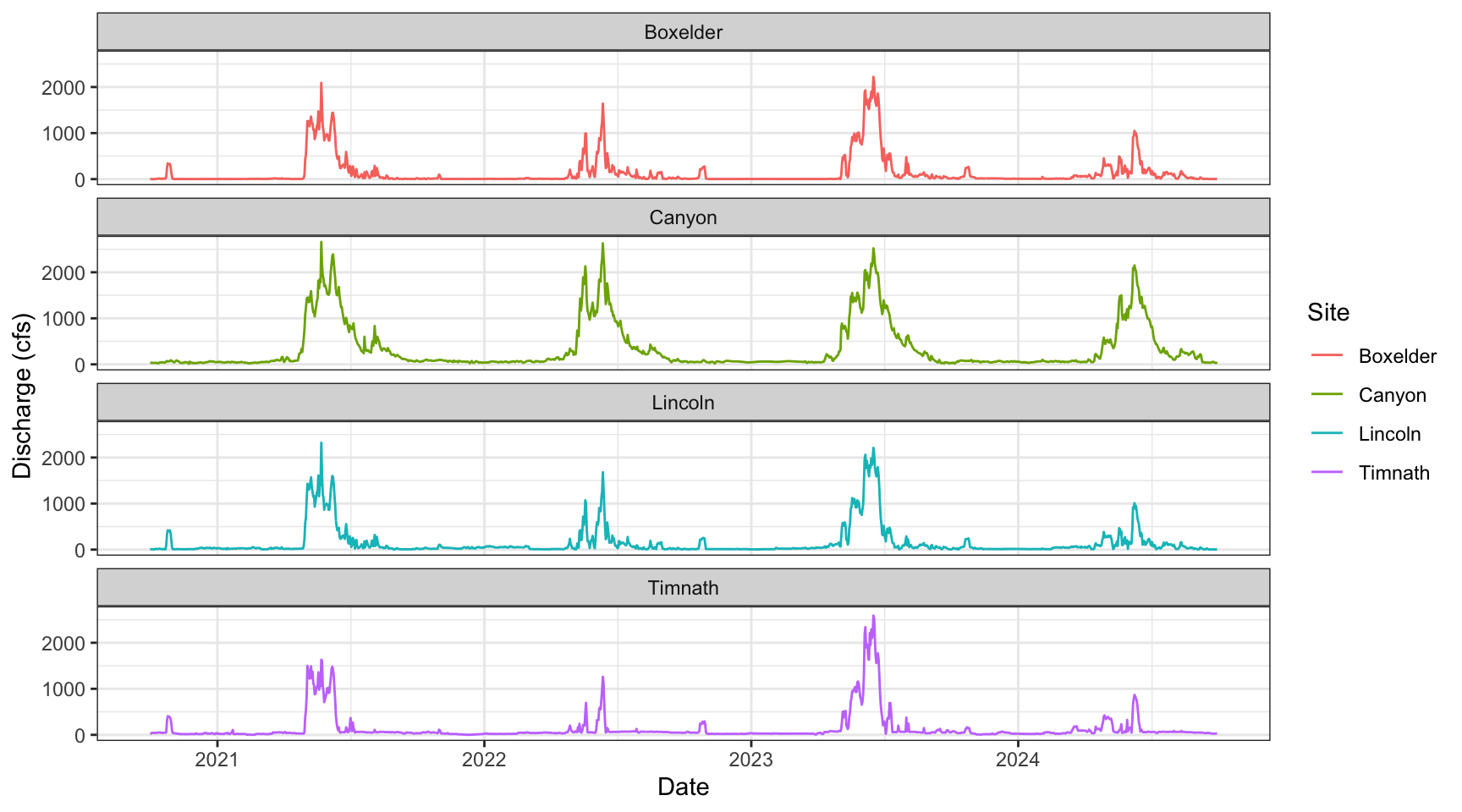
Say we wanted to examine differences in annual stream flow. We can do this with a little data wrangling, using the separate() function to split our “Date” column into Year, Month, and Day columns.
data_annual <- data %>%
  separate(Date, into = c("Year", "Month", "Day"), sep = "-") %>%
  # create monthly avg for plots
  group_by(Site, Year, Month) %>%
  summarise(monthly_q = mean(q_cfs))

# visualize annual differences across the course of each year
data_annual %>%
  ggplot(aes(x = Month, y = monthly_q, group = Year)) +
  geom_line(aes(colour = Year)) +
  facet_wrap(~Site) +
  theme_bw()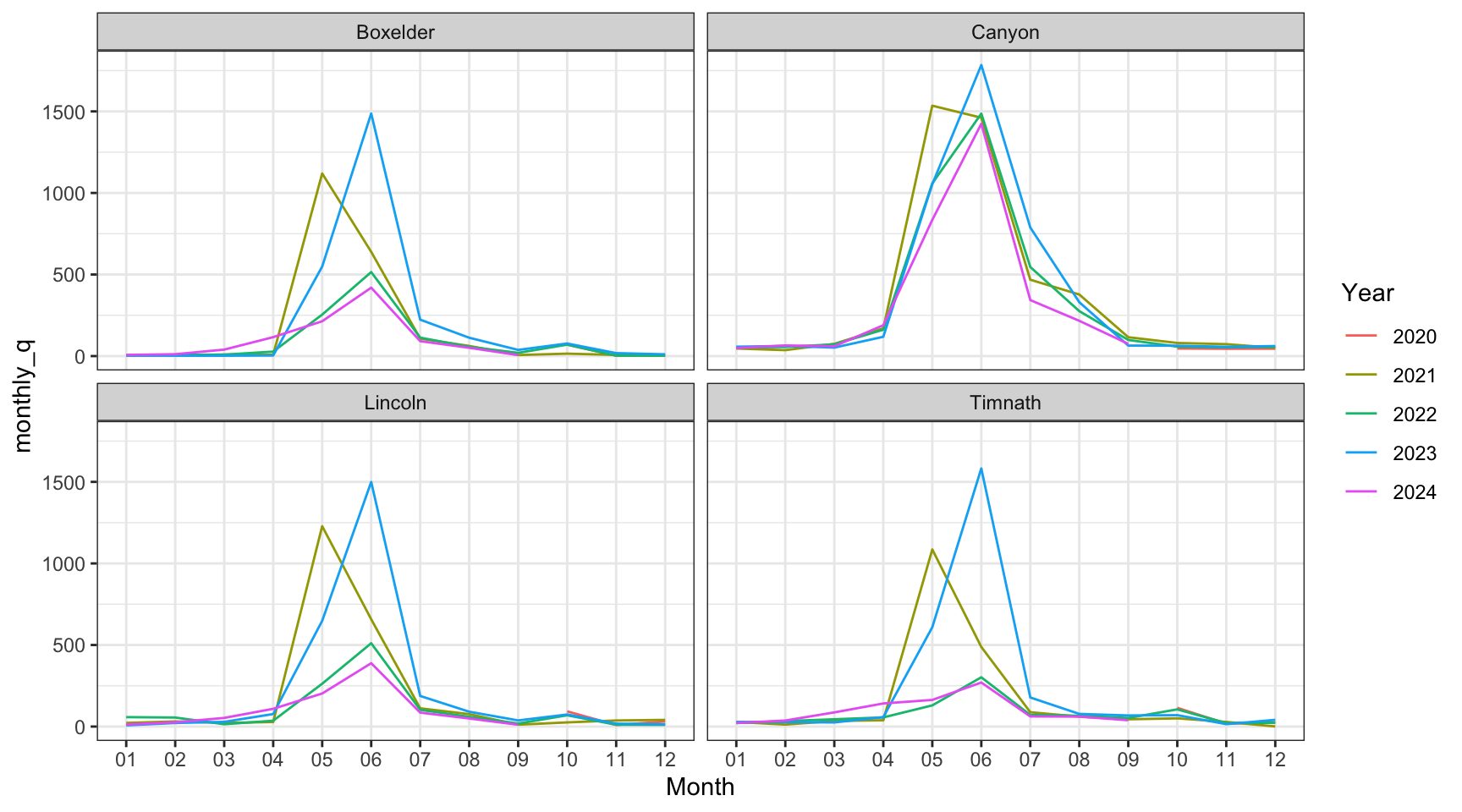
Let’s look at the daily difference in discharge between the mouth of the Cache la Poudre River (Canyon Mouth site) and each of the sites downstream. This will require some more wrangling of our data.
dif_data <- data %>%
  # select vars of interest
  select(Site, Date, q_cfs) %>%
  # pivot wider so each site is its own column
  pivot_wider(names_from = Site, values_from = q_cfs) %>%
  # for each downstream site, create a new column that is the difference from the Canyon mouth site
  mutate_at(c("Boxelder", "Lincoln", "Timnath"), .funs = list(dif = ~ (Canyon - .))) %>%
  # then pivot these new columns (i.e., NOT the date and canyon columns) longer again
  pivot_longer(-c(Canyon, Date)) %>%
  # keep just the 'dif' values
  filter(str_detect(name, "_dif"))


dif_data %>%
  # factor the site variable in order from distance to the canyon mouth for plotting purposes
  mutate(name = fct(name, levels = c("Lincoln_dif", "Boxelder_dif", "Timnath_dif"))) %>%
  ggplot() +
    geom_line(aes(x = Date, y = value, color = name)) +
    theme_bw() +
    facet_wrap("name")+
    ylab("Streamflow Difference from Poudre Mouth")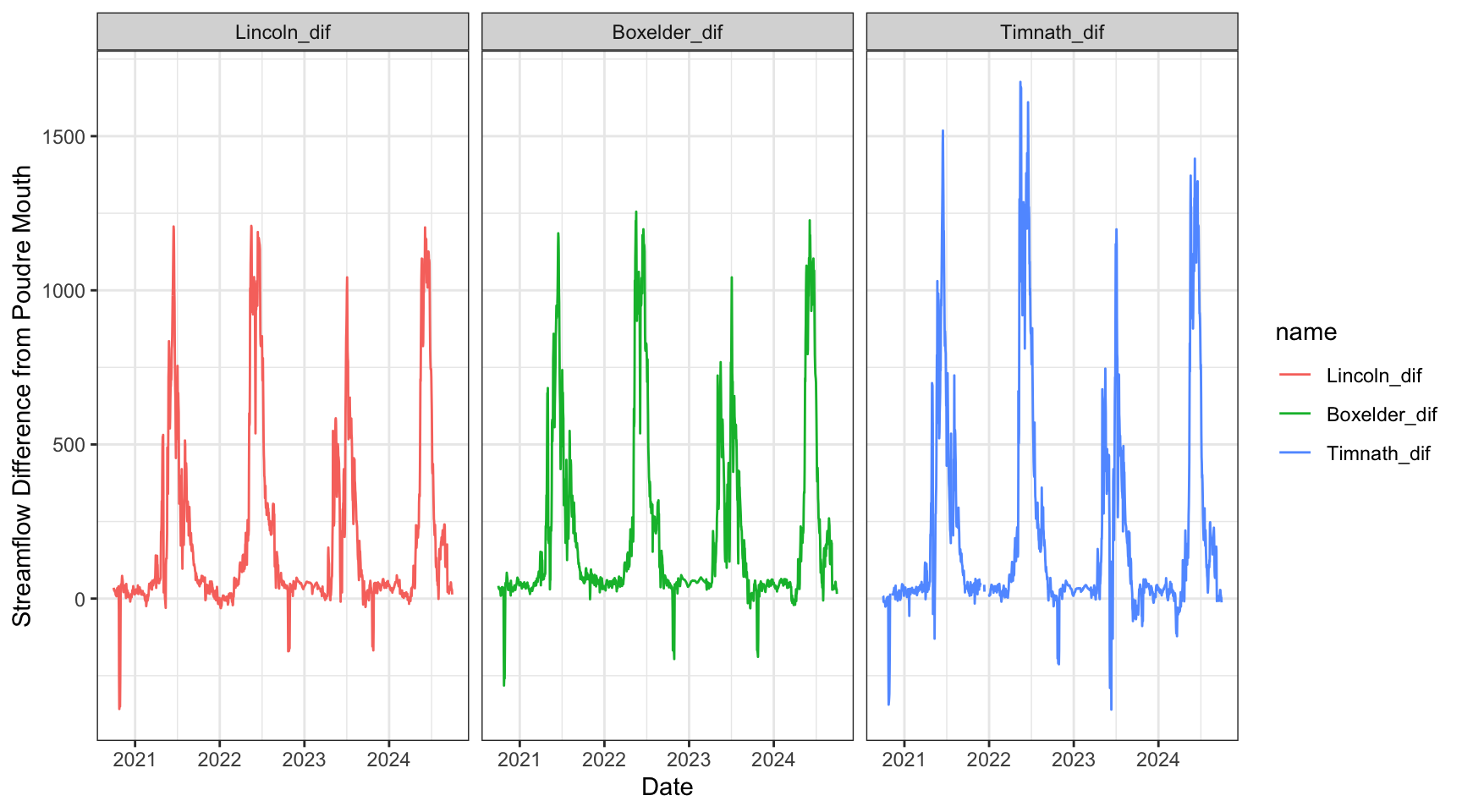
10.3 Data Analysis
Through our exploratory data analysis, it appears that stream flow decreases as we move through town. But, how can we test if these flows are significantly different, and identify the magnitude/direction of these differences?
Because we will be comparing daily stream flow across multiple sites, we can use an ANOVA test to assess this research question. We will set our alpha at 0.05.
10.3.1 Testing for normal distribution
ANOVA assumes normal distribution within each group - we can visualize each site’s data with a histogram:
ggplot(data = data, aes(x = q_cfs)) +
         geom_histogram() +
  facet_wrap (~Site)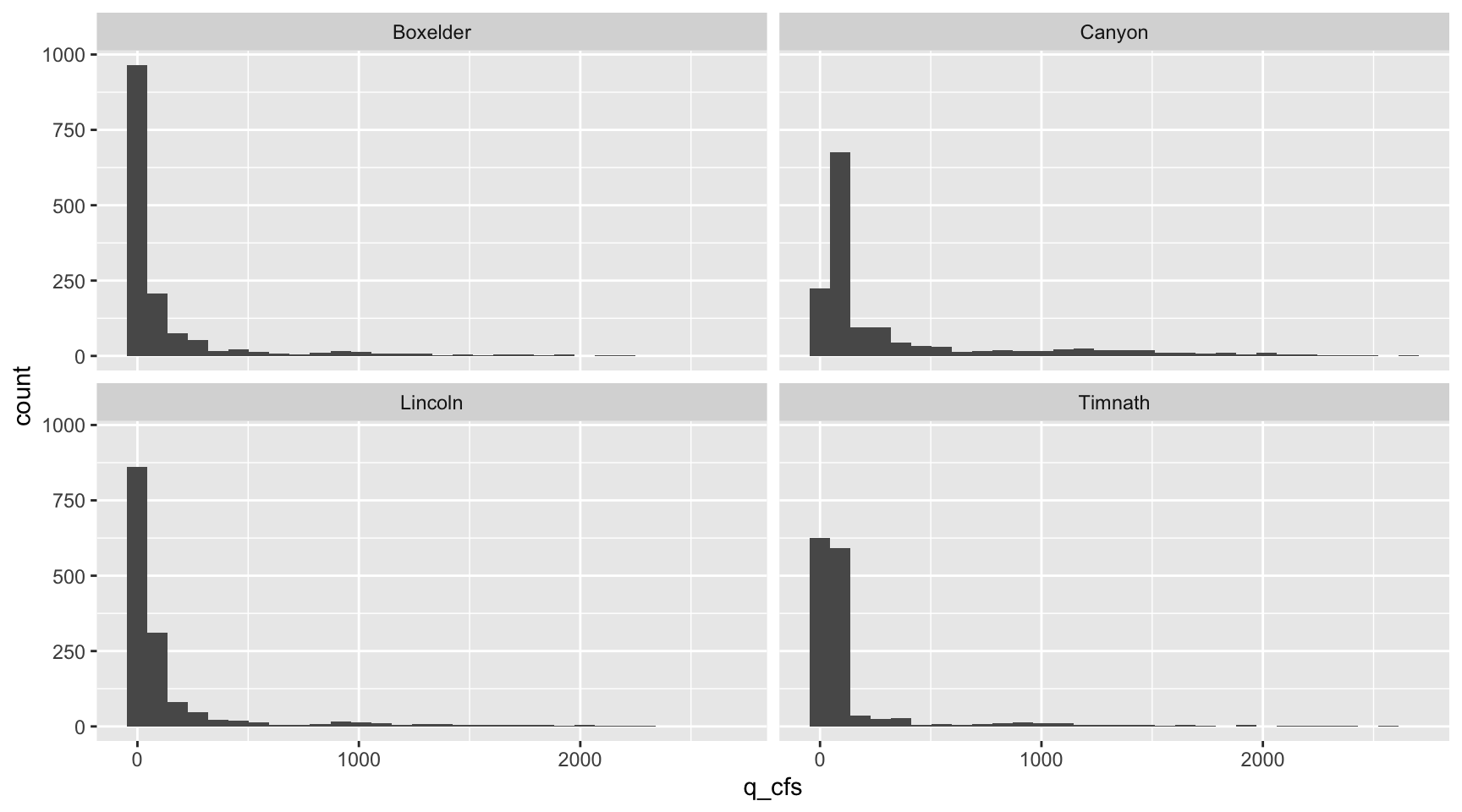
… and use the shapiro_test() function along with group_by() to statistically test for normality within each site’s daily stream flow data:
data %>%
  group_by(Site) %>%
  shapiro_test(q_cfs)
# A tibble: 4 × 4
Site variable statistic p
<fct> <chr> <dbl> <dbl>
1 Canyon q_cfs 0.623 1.95e-56
2 Lincoln q_cfs 0.429 5.37e-64
3 Boxelder q_cfs 0.438 1.07e-63
4 Timnath q_cfs 0.360 1.03e-65Since the null hypothesis of the Shapiro-Wilk test is that the data is normally distributed, these results tell us all groups do not fit a normal distribution for daily stream flow. It is also quite clear from their histograms that they are not normally distributed.
10.3.2 Testing for equal variance
To test for equal variances among more than two groups, it is easiest to use a Levene’s Test like we have done in the past:
data %>%
  levene_test(q_cfs ~ Site)
# A tibble: 1 × 4
df1 df2 statistic p
<int> <int> <dbl> <dbl>
1 3 8715 116. 1.43e-73Given this small p-value, we see that the variances of our groups are not equal.
10.3.3 ANOVA - Kruskal-Wallis
After checking our assumptions we need to perform a non-parametric ANOVA test, the Kruskal-Wallis test.
data %>%
  kruskal_test(q_cfs ~ Site)
# A tibble: 1 × 6
.y. n statistic df p method
* <chr> <int> <dbl> <int> <dbl> <chr>
1 q_cfs 8719 1677. 3 0 Kruskal-WallisOur results here are highly significant (extremely small p-value), meaning that at least one of our sites has a stream flow significantly different from the others.
10.3.4 ANOVA post-hoc analysis
Since we used the non-parametric Kruskal-Wallace test, we can use the associated Dunn’s test to test across our sites for significant differences in mean stream flow:
data %>%
  dunn_test(q_cfs ~ Site, detailed = TRUE)
# A tibble: 6 × 13
.y. group1 group2 n1 n2 estimate estimate1 estimate2 statistic
* <chr> <chr> <chr> <int> <int> <dbl> <dbl[1d]> <dbl[1d]> <dbl>
1 q_cfs Canyon Lincoln 2189 2191 -2044. 6020. 3976. -26.9
2 q_cfs Canyon Boxelder 2189 2191 -3051. 6020. 2969. -40.1
3 q_cfs Canyon Timnath 2189 2148 -1541. 6020. 4479. -20.2
4 q_cfs Lincoln Boxelder 2191 2191 -1007. 3976. 2969. -13.2
5 q_cfs Lincoln Timnath 2191 2148 503. 3976. 4479. 6.58
6 q_cfs Boxelder Timnath 2191 2148 1510. 2969. 4479. 19.8
# ℹ 4 more variables: p <dbl>, method <chr>, p.adj <dbl>, p.adj.signif <chr>The results of our Dunn test signify that all of our sites are significantly different from each other in terms of mean streamflow.
THOUGHT EXPERIMENT 1: Based on our results, which of our two gages have the greatest difference in mean daily stream flow?
THOUGHT EXPERIMENT 2: Is this an appropriate test to perform on stream flow data? Why or why not?